Asana Introduces New Outlook Integration Features
 Asana is an online application that helps teams track and manage their projects. It is a work platform that enables people in organizations to collaborate better. All their tasks, schedules, files, and other project assets are conveniently located in a centralized place. It also integrates with other applications such as email with its notification feature. Late last year, Microsoft Outlook launched actionable messages. In effect, it is now easier to update and take action on Asana email notifications within Outlook. For a powerful reporting and exporting tool for Asana, give our own tool Bridge24 for Asana a try, or access it in their own Integration page.
The problem with switching between apps
Many people use their Outlook inbox as their primary communication center. It is where they get not only their emails from co-workers, but also from applications. They can receive task notifications, event reminders, the latest feedback from their social media comments, and others. Right from Outlook, users can stay updated on important work, and also […]
New Improved Asana for Slack Integration Now Available
Asana project tracking and management software helps teams coordinate work to complete something more than the sum of their individual tasks. But even before completed tasks become a whole project, team members start with conversations and exchange ideas. As a communication tool, Slack is being used by a growing number of teams for real-time messaging. Introduced recently, a new Asana for Slack app for tighter integration between communication and work coordination is now available. For a powerful reporting and exporting tool for Asana, give our own tool Bridge24 for Asana a try, or access it in their own Integration page.
Turn Conversations into Actions
When team members exchange ideas with one another, their ideas become refined and take shape into something more tangible, applicable and realizable. Most of these teams use Slack for real-time communication. And as they bounce ideas off one another, the ideas can easily evolve into a new work that can help their product or service. The new Slack integration allows users to capture […]
Latest Asana Now Easier to Add Rich Text, Emojis, and more
Asana project management and tracking application is helping teams accomplish more. With its tools and features, work moves forward faster because people are able to collaborate better. Aside from promoting transparency, users are able to communicate with one another in connection with the tasks they are trying to complete. However, as more work and teams come together in the PM platform, the need to make things easier and clearer also becomes more regular. The latest release includes enhancements in text formatting, @-mentioning, and more. For a powerful reporting and exporting tool for Asana, give our own tool Bridge24 for Asana a try, or access it in their own Integration page.
Easier Text Formatting, plus Emojis
Communicating face-to-face allows people to convey not only their message or ideas, but also the speaker’s emotions. Therefore, those listening can also perceive the importance, excitement or urgency of the message through the speaker’s voice and body language. Obviously, these additional indicators are absent when just reading a comment regarding a task […]
Trello Launches New Home View and Notification Management
 Trello visual project management application has recently achieved a significant milestone. To date, over 2 billion cards have been created, helping its users plan, prioritize, and produce. Indeed, these cards represent, more or less, 2 billion ideas, tasks, and projects from all over the world. These cards contain all sorts of things, from helping teams deliver humanitarian aid, to families planning their camping trips. In line with continuing to provide people the central place for organization and productivity, it launches 2 important features: a new Home view, and a better notification management system. If you are looking for a great reporting and exporting tool for Trello, we suggest trying out our own tool Bridge24 for Trello.
New Trello Home View
The new home view is the equivalent of a central base of operations where users can find anything and everything important. Why go over countless boards, cards, and comments, and then try to prioritize which should be first when there is a better way? The new home view […]
Interactive Charts for Trello using Bridge24
 Trello is a great operational tool for users to centrally collaborate on board and card information. However, reporting features are limited! With Bridge24, users can connect dynamically to Trello and instantly create and export powerful charts and card lists for basic reports.
Benefits of Using Charts
Charts aide in a quick understanding of the distribution of cards and provide an overview to access information through a visual representation. Rather than looking through lists and lists of cards or extensive filtering and searching, find information at a glance visually through a chart. The chart can also be exported (PDF format) to share with managers or co-workers to quickly see patterns and other aggregate information for comparisons, etc.
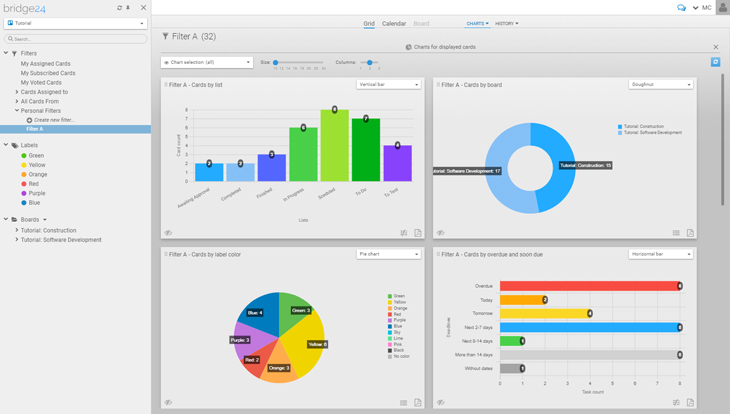
Charts Based on a Board or Filters, and How to Access
The charts in Bridge24 are contextual and based on the current cards displayed from a board or filter results. In the case where you wish to include archived […]
Interactive Charts for Asana using Bridge24
Asana is a great operational tool for users to centrally collaborate on project and task information. Reporting features, however, are limited. With Bridge24, users can connect dynamically to Asana and instantly create and export powerful charts and task lists for basic reports.
Benefits of Using Charts
Charts aide in a quick understanding of the distribution of tasks and provide an overview to access information through a visual representation. Rather than looking through lists and lists of tasks or extensive filtering and searching, find information at a glance visually through a chart. The chart can also be exported (PDF format) to share with managers or co-workers to quickly see patterns and other aggregate information for comparisons, etc.
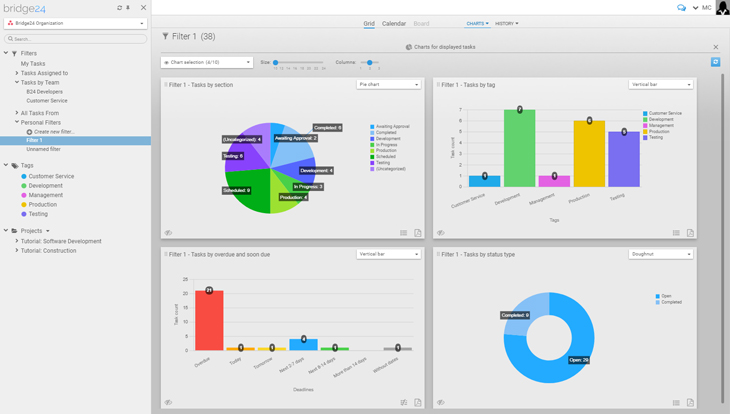
Charts Based on a Project or Filters, and How to Access
The charts in Bridge24 are contextual and based on the current tasks displayed from a project or filter results. In the case where you wish to include completed tasks, you can create […]
Asana Announces Release of New Timeline View
Asana is being used by project teams all over the world. Project management is a profession that is growing exponentially. Enterprises and organizations have seen the the value it brings to the company and its customers. Unfortunately, not all in the project leadership position are professional project managers, and many find themselves there without applying to the position. Many accidental project managers are overwhelmed by difficult coordination issues and tight deadlines. As a solution, Asana recently announced a new feature called Timeline to help teams see how their work fits together. For a powerful reporting and exporting tool for Asana, give our own tool Bridge24 for Asana a try, or access it in their own Integration page.
Introducing Asana Timeline
Timeline is available to Asana Premium customers. It is the latest tool that enables teams to make the most of their plans, tasks and time. Indeed, creating a plan is the first step to a successful project management, execution and delivery. However, starting from scratch to create […]
Trello Custom Fields Power-Up Expands Big Time!
Trello project management and collaboration software is a highly visual and flexible tool. It applies to a variety of work requirements for various groups of people. Teams use it to easily organize and prioritize their projects. Specifically, Power-Ups expand its capabilities further by bringing integration features right into boards and cards. In 2016, it announced the release of the Custom Fields Power-Up to help users maximize their workflow. Now, users can enjoy even more its expanded capabilities. If you are looking for a great reporting and exporting tool for Trello, we suggest trying out our own tool Bridge24 for Trello.
Custom Fields Go Mobile
The first welcome news about the latest Custom Fields Power-Up is its availability on mobile devices. Both iOS and Android apps now support custom fields. Therefore, users can experience the additional benefits of having more context for their cards even outside the office. Furthermore, they can also create new fields or input/edit field data. So, all their custom fields from the web are […]
Trello For Google Hangouts Chat Brings Seamless Collaboration
Trello makes managing projects and organizing just about anything easier. It helps that it is highly visual and flexible for many types of tasks. Modern work becomes less complex and more manageable with the help of technology and web applications. For example, Google’s Hangouts Chat is now available to bring teams together and do their work in one place. At the same time, the Trello for Google Hangouts Chat was launched. Now, collaborating on Chat to manage projects has just become simpler and smoother. If you are looking for a great reporting and exporting tool for Trello, we suggest trying out our own tool Bridge24 for Trello.
Trello For Google Hangouts Chat Power-Up
The new Hangouts Chat Power-Up enables users to get Trello alerts in their chat window. As a result, teams are able to stay in the loop and maintain productivity even while chatting. More and more people are turning to technology to provide them with better ways of communication. With this Power-Up, they are able […]
Bridge24 News: Affiliate Program Launched
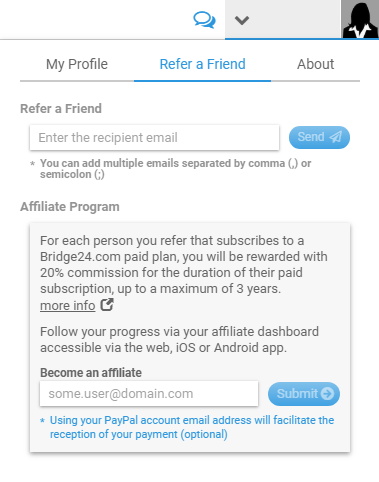
 Bridge24 is continually picking up steam, thanks in part to those users that spread the word about our great product! A number of new features have been added to help disseminate information to others including a simple invite and also an Affiliate program. The Affiliate program allows you to collect a 20% commission if users you tell Bridge24 about decide to purchase a Premium subscription through your affiliate link.
Affiliate Program
Telling your friends or colleagues about Bridge24? Or writing a blog post to provide your readers with information about the features and power of Bridge24? Why not provide them your Bridge24 Affiliate link! You can earn a 20% commission on users that use your link to navigate to the Bridge24 site. It is really easy. Simply sign up for the Affiliate program from the Refer a Friend panel of the Profile area.