All Cards from All Workspaces now Available for Trello

  • Grid: The workspace column can be added in the grid view. You can also group by workspace and sort by workspace;
  • Charts: Create a chart and see your cards by workspace (vertical […]

    After several requests from our Trello customers, we are pleased to announce that you can now view cards from all your workspaces simultaneously. Previously, you had to select a specific workspace, but now a new option is available to you: “All My Workspaces”.

    How to display all cards from all workspaces?

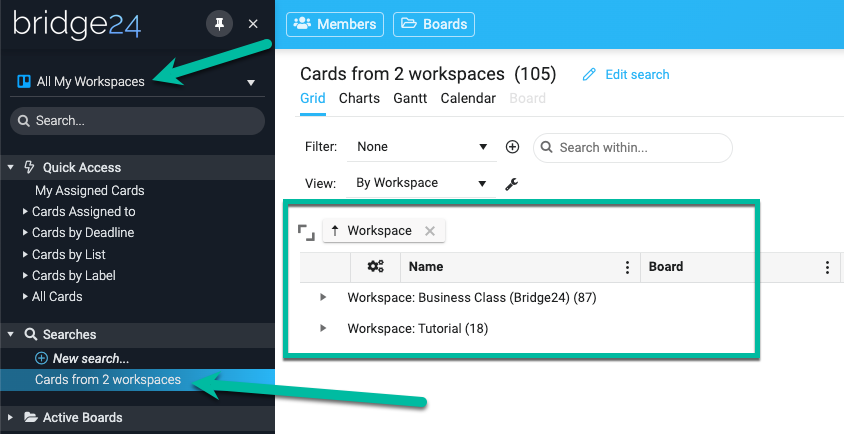
    On the left-hand side panel, instead of selecting a specific workspace, you can now select “All My Workspaces”. The image below shows a search from two boards of two different workspaces. The grid view indicates 105 cards grouped by two workspaces.

    Where can I see my cards by workspace?

    Most views can show your cards by workspace.

    • Grid: The workspace column can be added in the grid view. You can also group by workspace and sort by workspace;
    • Charts: Create a chart and see your cards by workspace (vertical […]
By |2025-11-14T09:44:44-05:00September 14, 2023|

Calculated Fields for Asana, Basecamp, and Trello

Calculated fields or computed fields are a feature that allows users to perform calculations based on values from other fields within the same project. They are typically used to automate the calculation of values that would be time-consuming or error-prone to do manually.

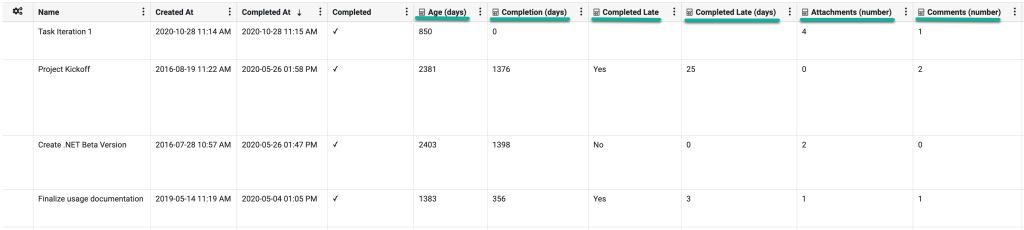
Bridge24 offers six calculated fields for Asana, Basecamp, and Trello. These fields can be used in most views: grids, charts, reports, and exports.

Age (days): The amount of time (in days) that has passed since the task was created. We calculate the value using the “Created At” field with today’s date.

Completion (days): This represents the number of days it took to complete the task since its creation. We calculate the value by taking the “Completed At” and the “Created At” fields.

Completed Late: This represents whether a task was completed on time. We calculate the value […]

By |2025-11-14T09:44:57-05:00March 2, 2023|

How Do You Use Trello for Agile Development?

There’s a reason businesses and teams choose Agile methodology – it brings changes and flexibility to the business quickly. Teams can manage a project quickly by segmenting it into smaller, manageable chunks of work that are prioritized and iterated on. Every project stage involves constant collaboration with stakeholders and continuous planning and improvement. Although initially used by software development teams, professionals in other sectors have embraced agile development and are actively using it to boost their productivity. And thanks to tools like Trello, teams can now apply the Agile methodology to handle projects and tasks effectively.

Whenever you need an advanced reporting and exporting platform that will boost Trello’s capabilities, consider Bridge24 for Trello.

Trello is a web-based application inspired by the Kanban system, and it smoothly accommodates Agile principles. It’s easy to use and offers a visual approach to project management. Teams can use Trello’s board, lists, and cards to create […]

By |2023-02-26T09:11:39-05:00February 26, 2023|

Trello – Backup & Export your Documents & Files in Bulk

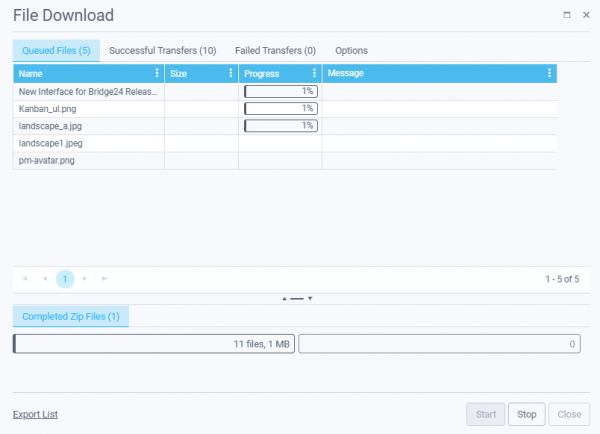
A heavily requested feature for Trello users of Bridge24, we are excited to provide access to the File Download Manager. This allows the punctual or bulk download of files (attachments) associated with cards (documents, images, other) within a card, a search set of cards, a board, or across multiple boards. It has been optimized to track the transfer status and provides an index and log in structured zip files. Whether just with a few attachments or a full backup of 10s of GBs of files, this feature is robust and gets the job done!

File Download Manager usage

1) Active Search results

Be sure to create a Search or use the Quick links to access and display your Active search results in the Grid. You can then filter the returned cards as desired to include the cards with attachments that you are interested in downloading. (Option – Use the column […]

By |2023-02-21T13:57:31-05:00February 21, 2023|

User List Panel + Invitation for Asana, Trello, and Basecamp

Bridge24 is still evolving with a panel displaying the list of your users in a comprehensive grid, allowing you to filter, sort, group, and export them to Excel. Moreover, you can now easily invite your users to use Bridge24 with a single click of a button.

Table of Content

Asana

How to open the User List for Asana?

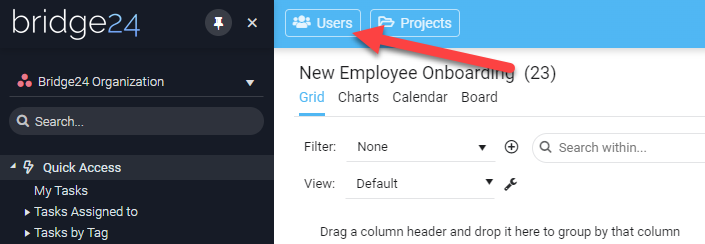
Simply use the “Users” button located at the top upper left of the screen. See the image below:

What columns are available in the panel view for Asana?

The user panel allows you to add/remove the columns in the grid by simply clicking the 3-dot menu for any column. You can choose among 4 columns […]

By |2025-11-14T09:45:03-05:00January 13, 2023|

Introducing the Project List Panel for Asana, Trello, and Basecamp

Bridge24 is still evolving with a panel displaying the list of your projects (Asana and Basecamp) or your boards if you are using Trello. This new panel displays all your projects/boards in a comprehensive grid, allowing you to filter, sort, group, and export them.

Table of Content:

Asana

How to open the Project List for Asana?

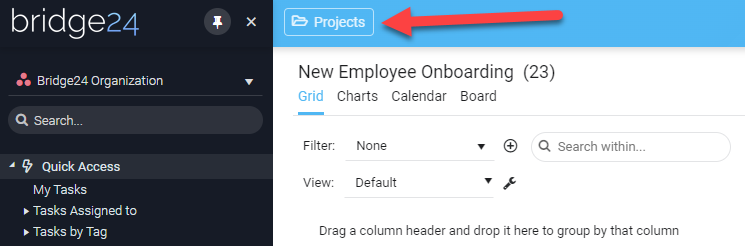
Simply by using the “Projects” button located at the top upper left of the screen. See the image below:

What columns are available in the panel view for Asana?

The project panel allows you to add/remove the columns in the grid by simply clicking the 3-dot menu for any column. You can choose […]

By |2025-11-14T09:45:09-05:00October 5, 2022|

Creating a Kudo Company Culture in Trello

Unfortunately, many employers overlook the massive positive impact even the slightest acknowledgment can have on an employee’s motivation. Studies have shown that lack of recognition is still a leading factor in employee dissatisfaction.

With all of the technology available to streamline business functions, it is easy to get lost in focussing only on the data or performance of our business. The trick is combining both technology and the human touch to give much-deserved credit to our employees. Harnessing your existing business tools to do so is a great way to show your team that their hard work does not go unnoticed.

One of these tools is Trello, a collaboration tool that helps organize your projects into boards. This tool gives you and your team a clear view of what tasks require attention, who is responsible for the execution, and deadlines for each of these tasks. While Trello was designed as an effective organizational tool, […]

By |2022-05-25T15:24:32-04:00October 13, 2021|

How Can Trello Be Improved?

Trello is an online collaboration tool known for its flexibility and awesome collaboration features. At its core, Trello is a system of visual boards, lists, and cards. You can use it to prioritize tasks, assign work, exchange resources, communicate ideas, view your team’s progress, and so much more. You can also tweak your board in different ways to fit the evolving needs of your project.  Its simplicity and versatility is what makes it a powerful tool. Trello supports teams of all sizes and is ideal for marketing teams, freelancers, HR teams, product developers, design teams, individuals, and a wide range of other collaborative tasks.

Although Trello has amazing features, it’s not a complete tool by itself. It has some gaps in its features that can limit how you work on your project. Fortunately, Trello allows you to combine it with other third-party tools to fill these gaps. Although there are multiple Power-Ups, some features are still unavailable or aren’t […]

By |2021-02-20T11:18:15-05:00February 20, 2021|

Butler Commands for Trello

If you want to ramp up your productivity and slash the time you take to accomplish work, you need to get the right tools. Trello is one amazing productivity tool that can transform the way you approach your projects and workflow. It offers great productivity and collaboration features for teams of all sizes. Whether you’re an individual using Trello to plan simple daily tasks or a large team working on a complex project, you can take your productivity to another level by enabling the Butler tool inside Trello.

Butler is a super powerful tool that lets you automate your Trello board. It was founded by Oscar Triscon after he realized that there wasn’t a solution for automating Trello’s manual processes. The tool suddenly opened up an entirely new way of using Trello, and in 2018, Trello acquired it and made it one of the core features of their platform. Remember, there are also other tools that you can combine […]

By |2021-02-20T11:17:40-05:00February 20, 2021|

The STOP Method and How to Apply it to Trello

The Sequential Thematic Organization of Publications (STOP) method is a technique used to organize and write reports, proposals, and technical content. It brings greater outlining control to the document and improves its editorial standards. The concept allows writers to develop readable technical documents that users can easily digest. Below we will take a deeper look at the STOP concept, and how you can apply it to Trello. Remember that you can unlock Trello’s full potential by combining it with Power-Ups. For instance, you can integrate your account with Bridge24 for Trello to bring advanced reporting and exporting features to your board.

A Brief History of STOP

The STOP methodology was pioneered by the Hughes Aircraft Company (now Raytheon) in the 1960s. The technique was developed after the company faced challenges in creating proposals. The company needed to draft a huge number of proposals, yet they didn’t have enough authors to handle […]

By |2022-05-25T15:42:25-04:00February 20, 2021|
Go to Top