
Scaling Link Building Using Asana
I personally love using Asana. I’ve been doing link building in SEO for a decade and it’s always been challenging to manage and track the process and progress in a link building campaign. Quite often, the link building team gets lost in the amount of spreadsheets, tabs, notes and emails that it makes the entire process fall apart.
Designmantic.com, which is the company that I work for; implemented Asana into their link building campaign this year. In this post, I’d like to share how we set it up and the benefits that we’ve been able to gain as a result of using switching to Asana and setting up our process using the project management software.
The dashboard snapshot.
We can configure Asana to show a list of completed projects under a section. We want to know at a glance how many links have gone live and what is the rate of growth that we are experiencing. Managers can look at this snapshot and see if the growth is progressing or if changes in the strategy or tactics are […]
Export Asana Data Easily With Bridge24 – An Interview with Todd Cavanaugh
Asana Training and its services
Asana Training was founded by Todd Cavanaugh and they specialize in deploying and optimizing Asana as a project management platform. They offer a Masterclass especially for project managers, small business owners and project team members. It is self-paced and accessible over the Internet. They also offer on-site training seminars, virtual training seminars, workspace audit, and employee onboarding. This article is a summary of an interview by Todd Cavanaugh with Michael Claassen about Bridge24.

Bridge24 with Asana Interview
What is Asana?
Asana is being used by a great number of teams and organizations around the world. They are able to collaborate and track the progress of work using a central online application. However, in spite of its popularity, not everyone is in Asana. Thus, there is still a need to export information to others, such as an executive team, or for an offsite meeting. Here, they might still prefer reading reports in Excel or in printouts. Unfortunately, Asana’s reporting and exporting features are […]
Basecamp 3 Integration Ready – Export Excel and Reports
 It is here! For all those campers out there requiring structured access to To-do’s across projects, you will be pleased to know that we have released support for Basecamp 3 in Bridge24. Quickly connect, display and consult To-do’s in our Power grid, then export them into Excel and CSV.

Within the Power Grid, easily:
- Show/hide columns and ordering – view or hide only the fields you want to see
- Column sorting – ascending/descending
- Group columns – Quickly consolidate information using values in a column
- Search within – isolate To-do’s containing keywords
- Edit a To-do – Click on a To-do and edit from the Basecamp3 pop-up
Create Filters:
Create and use filters to allow quick access to what you are looking for. Filters are easily accessible from the left tree view. Filter by project, assignee, status and include incomplete and completed to-do’s.
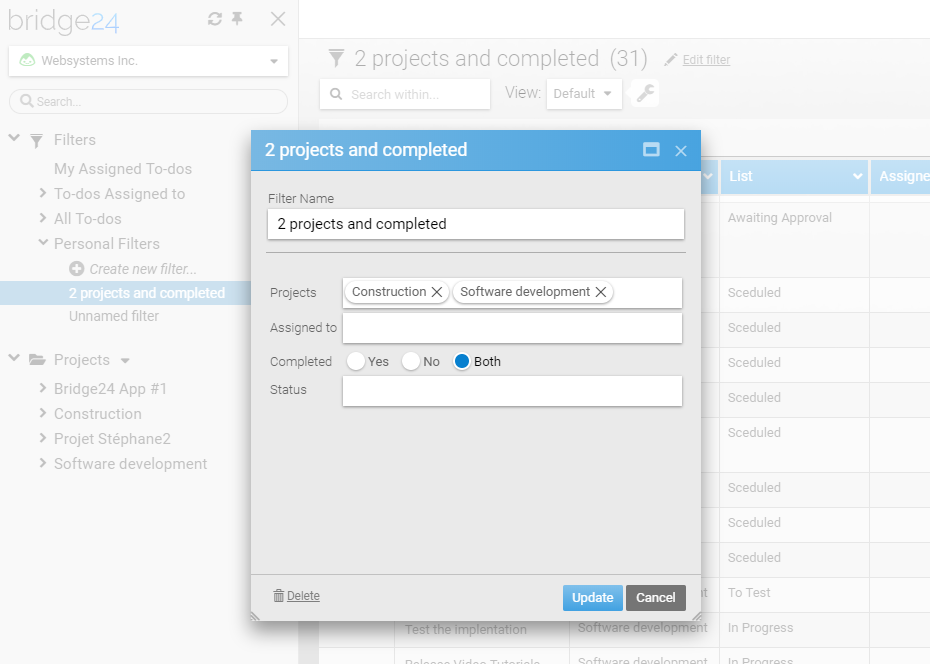
Export your To-do’s to Excel:
- Excel and CSV export formats supported
- Fields from a view, or all […]
Basecamp Adds Image Galleries and Recurring Events Features
Basecamp project management and team communication software is helping more and more companies get a better handle of things. By seeing exactly what needs to be done, teams and organizations have become more efficient in how they accomplish work. At Basecamp itself, employees frequently make presentations, such as mockups or interface design revisions. When presenting before and after screens, they are usually limited to showing only full-width images. Thus, presenting a comparison is difficult, until about a month ago. Now, users can add image galleries to support and enhance their writing. Also available are enhancements on toolbar for images and support for recurring events. For a great reporting and exporting tool for Basecamp, we recommend you use our own tool Bridge24 for Basecamp.
New Side-by-side Image Gallery
Image galleries are great additions to written posts. As they say, a picture is worth a thousand words. Galleries are very useful in sharing screenshots, showing comparisons, presenting mockups, sketches, and photos. Now, it is easy to make a gallery […]
Basecamp Latest News: Protected 2FA Login, iOS App Updates
 Basecamp announced that they have stopped with their own SMS verification program as a security factor for signing in. This is in light with the report from the US NIST that SMS as a second security factor is insecure and is no longer recommended when signing in web applications. Therefore, Basecamp has switched to Google’s 2 Factor Authentication system since July this year. It also has new features such as a brand new tab, a view switcher, and other updates since version 3.9.3. For a great reporting and exporting tool for Basecamp, we recommend you use our own tool Bridge24 for Basecamp.
More Secure Basecamp Login
The US National Institute of Standards and Technology reported as early as 2016 that using SMS to deliver 2 factor authentication is unreliable and insecure because of the likelihood of interception. Basecamp has had its own homegrown SMS verification program. Now that it has been ended, users who wish to secure their account with 2FA need to log in using their Google […]
Advanced Reports with Custom Fields for Asana and Trello
 A lot of requests have been made for more customization of reports for output to PDF and Excel, etc. One frequent request has been the ability to add more columns to the report. In the most recent release, a more Advanced and flexible report has been provided including:
- 2 level grouping (project and assignee, or board and member, etc)
- Indentation of subtasks (down to 5 levels) for Asana, and inclusion of checklists for Trello
- Adding up to 4 additional fields to the output

Select Report Parameters:
- First level – The top level grouping column
- Second level – The next grouping column to classify/group by
- Asana: Subtask level – How many subtask levels will be included. Select “none” to not include subtasks in the report.
- Trello: Display checklists – include checklists in the report
- Selected columns – In addition to the Task name, choose 4 additional fields to add into the report. You can add also your custom fields
- Status to exclude – […]
New Trello Features, Power-Ups, and Tricks To Try
 Trello helps countless teams manage their projects in an easy and fun way. And it gets easier and more exciting as new features become available almost every month. Now, users are using emoji reactions, an informative Home screen, and an Inspiration portal, among others, to collaborate with the rest of the team in better and more meaningful ways. In fact, just this July, this project management software introduced several new features, 3 Power-Ups and mobile app enhancements that will bring more smiles. If you are looking for a great reporting and exporting tool for Trello, we suggest trying out our own tool Bridge24 for Trello.
New Features: New Sort Options
Users now have more options to sort their card list. Depending on the items added on the cards, people can now sort by date created, either newest first or oldest first. They can sort by due date, if that is added on the cards. They can sort by the number of votes a card received, if the Voting […]
8 Browser Extensions For Trello To Amp Up Productivity
Trello visual project management and work organization software is being used by individuals, teams and companies across the globe. It enables them to complete tasks, meet deadlines, and achieve goals in a simple and collaborative way. It is easy to use and very flexible. Power-Ups or integrations allow the software to bring in more features from third-party applications. These Power-Ups provide stable and reliable functionality to core features. Another way to enhance the PM software is by using browser extensions. If you are looking for a great reporting and exporting tool for Trello, we suggest trying out our own tool Bridge24 for Trello.
8 Trello Browser Extensions
These browser extensions enable Trello users to experience an additional one or more features. They are all Chrome extensions, but if similar ones exist for other browsers such as Firefox and Safari, they are mentioned. Opera users can add all the extensions for Chrome but they need to install the Chrome Extensions add-on first.
1. Original Card Counter for Trello
Original Card Counter […]
Basecamp Announced Hey! Improvements for Android App
Basecamp solves many business communication problems by keeping everyone on the same page. The online software has helped thousands of companies get a better handle on their business. Projects get off the ground faster when teams are collaborating more and communicating efficiently. It has web and desktop versions, but also works on mobile devices. A couple of months ago, it announced screen improvements on Hey!, the go-to screen for all communication and notifications, on its Android app. For a great reporting and exporting tool for Basecamp, we recommend you use our own tool Bridge24 for Basecamp.
New Hey! Screen in Basecamp 3 for Android
A new Hey! screen design became available starting with Basecamp 3 for Android v3.9.1 last May. The goal of the design was to help users catch up easily using their Android devices. The web and desktop versions are already very good, so people on the go should have a similar experience. Since Hey! is the tool that helps them prioritize, it is only […]
New Features in Basecamp 3.9 for iOS
Basecamp online software for project management and team communication helps people work in one organized place. Although work nowadays is not necessarily confined in one room or office, users can still keep everyone on the same page with the help of its native apps on mobile devices. The PM software is ready whenever and wherever they are. In fact, the latest release 3.9 for iOS devices is providing improved usability features, especially for team members on the go. For a great reporting and exporting tool for Basecamp, we recommend you use our own tool Bridge24 for Basecamp.
Improved Find tab
Basecamp 3.9 for iOS includes improvements on the Find tab. When users open the Find tab, they can jump back to anything they have recently viewed. They quickly see their most recently visited pages. Thus, they can get back to what they were viewing. They do not even have to type a word. When they do type something, the tool immediately starts searching for it in their […]