Asana Reached 50,000 Paying Organizations Amidst Accelerated Growth
 Asana is an online productivity tool that provides teams and companies clarity. People are able to work together better because they have a clearer view of what, how, and who they are doing work with. In 2017, the company announced reaching over 20,000 paying customers. After just 6 quarters, they are now celebrating 50,000 premium customers, all managing and tracking their work in Asana. For a powerful reporting and exporting tool for Asana, give our own tool Bridge24 for Asana a try.
Asana Milestones
Asana is excited to announce the achievement of several important milestones. Launched 6 years ago, it has now reached 50,000 paying organizations worldwide. What is exciting is not only the great number, but the pace as well. In 18 months, the number of paying customers more than doubled, from 20,000. This is on top of the 1 million registered users who are using the free plan. Furthermore, revenue accelerated in each of the past 6 quarters. Revenue growth rate is now about 90 percent […]
Asana Introduces Brand New Homepage
Asana team software makes it easier for people to manage projects, track progress, and coordinate work. It also continues to update the software with new tools and functionality to adapt to users’ changing needs. About a week ago, it slowly launched a new Homepage. After logging in, a user will automatically land in his or her Homepage to quickly get back to whatever they are working on. For a powerful reporting and exporting tool for Asana, give our own tool Bridge24 for Asana a try.
Homepage -What is it for?
The new Asana Homepage aims to provide users the first place where they can find specific important projects. A team or Organization may be working on multiple projects, but users are usually working on a few at a time. The Homepage provides an easy access to a list of their Favorite Projects and Projects they have recently worked on. Therefore, with this brand new Homepage, teams can spend less time searching or going back to their work. Instead, […]
Basecamp 3 New Features and Improvements Round-up
 Basecamp 3 is a business solution especially for growing companies in need of a centrally organized workspace. It is for the business owner and team who are getting overwhelmed by emails, conversation threads, project documents, status reports, and other work items scattered all over the place. With a seamless combination of tools packaged in a single application, users are able to see what needs to be done and by when. This past month, a batch of fresh updates, such as a new progress tracking chart, custom-colored folders, project tools, and more, become available. For a great reporting and exporting tool for Basecamp, we recommend you use our own tool Bridge24 for Basecamp.
New Hill Charts
Basecamp 3 is introducing Hill Charts, a new way of seeing the bigger picture of a project. The concept is based on the idea that every piece of work has 2 phases. The uphill phase is where users figure out their approach. In the middle is like being at the top of […]
Asana Vs Trello: Which Is Better for Creative Teams?
 As the world moves increasingly to the cloud and the number of remote workers grows steadily higher, a range of tools have cropped up to help businesses and entrepreneurs work more efficiently. These span everything from money management to HR systems, covering every base a business might need. One of the more popular services that have arisen are productivity tools, in particular Asana and Trello.
These both provide teams with a way to track projects and assign tasks with far more ease than long, confusing email threads. But these tools are both very different in how they work, and one might be more suitable for you than another, especially as a creative. Let’s run through the pros and cons to find out which productivity tool is right for you.
Why use project management software?
Many businesses now make use of project management software to keep track of day-to-day tasks, as it offers a plethora of benefits. PMS is especially useful if you run a small business with […]
Advanced Reports for Basecamp 3 using Bridge24
Bridge24 for Basecamp is now being used by more and more Basecamp users to access to-dos across projects, as well as to output information such as reports into excel or PDF. New features for users are now available from within Bridge24.
Bridge24 Advanced Reports
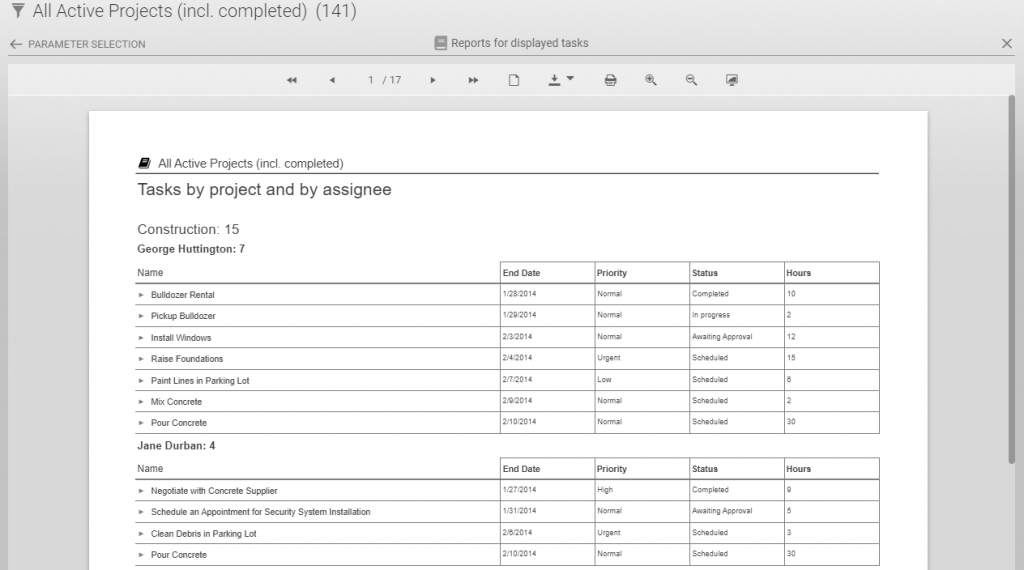
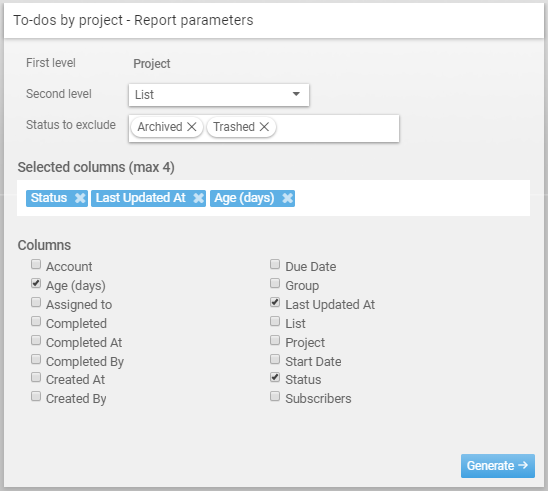
This week saw the introduction of Advanced Reports. Users can now prepare a 2 level report (grouping) and include up to 4 more fields in addition to the to-do name. This easy to use report creation tool also allows you to export the report into a convenient PDF or Excel file, as well as others.

Configure and generate the report
Select the first and second level grouping parameter and fields to include, then generate.
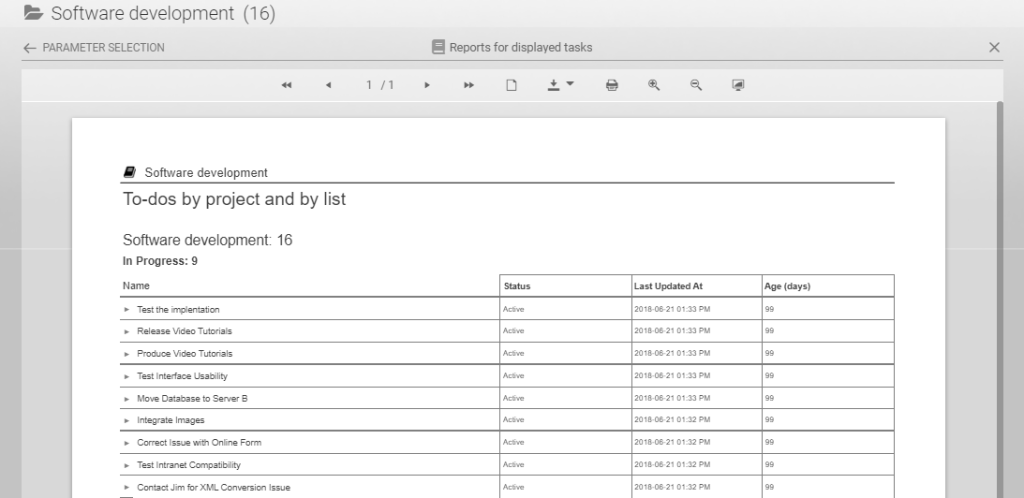
The report is created and the user can navigate directly and then export to the desired format such as PDF or Excel.
Bridge24 Officially Recognized by Basecamp
We are excited to announce that Bridge24 has been accepted in the App Extras directory for Basecamp. Bridge24 for Basecamp is a reporting and exporting application that enhances the functionality of Basecamp.
Access the Basecamp Extras page detailing the connection with Bridge24 in the reporting section. Bridge24 was classified in the Reporting category since one of the main uses is to dynamically display and filter Basecamp to-dos and of course create reports. Although it does much more than that, including a power grid and exporting any view to Excel.
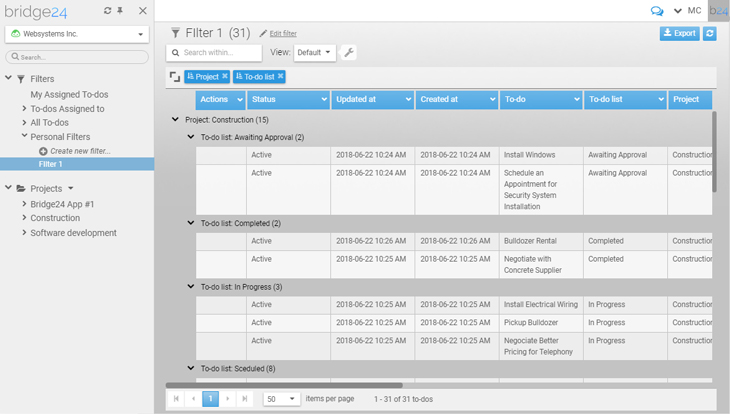
Filter To-Dos
- Create & save multiple filters for easy access to specific information
- Use the Quick Search in all views to quickly filter & display information
- Use multiple level grouping & sorting to segment to-dos easily
Advanced Reports
Basic and Advanced reports provide a way to organize and present your to-dos across projects. The advanced reports contain 2 grouping levels and you can add an […]
Asana Announces New Features in Latest August 2018 Release
Asana is an online application that helps teams manage their projects and track its progress. As more people and organizations adopt it as a business solution, more feedback and requests also are given to improve it. As of August 2018, new features are now available to customers with its latest release. They cover a wide range of areas, from boards and tasks, to custom fields and mobile apps. For a powerful reporting and exporting tool for Asana, give our own tool Bridge24 for Asana a try, or access it in their own Integration page.
On Boards
The Board layout is one of the views available in Asana. It allows users to organize work and move it across columns. They can quickly see an overview and its progress as tasks move from one phase to the next. With the latest release, they can now drag multiple cards simultaneously to another column. Users just have to press Cmd or Ctrl and click on the multiple tasks on the board. […]
Asana Experts – The Complete Experts Directory
 Asana project management software is an online application that enables its users to centrally collaborate on project and task information. With this tool, teams are able to coordinate their work better together. Members know what to do, who will do it, and when they need to do it. Businesses and organizations have been transformed for the better, and those who adopted it are enthusiastic to share their knowledge and experience to others. As an experts directory, Asana Experts is one of the most complete for people looking for help. For a powerful reporting and exporting tool for Asana, give our own tool Bridge24 for Asana a try, or access it at their Integration page.
Introducing Asana Experts
Asana Experts is the go-to place for individuals, teams, and companies looking for expert resources and professional services regarding Asana. It is a comprehensive list that includes experts across the globe. Its main goal is to encourage interactions within the Asana community. Now, Asana hosts its own community site […]
Trello in the News: September 21, 2018
 Our goal is to monitor everything that is written about Trello on a daily basis. All articles below were published on September 21th 2018 and are about how Trello can complement your business needs. You have a link to each original article, and also Twitter links if you want to contact the article’s author or the website’s owner for more information.
If you are a Trello user and need a great reporting and exporting tool, we recommend using our own tool Bridge24 for Trello.
Tips for building business to business products
Article Quote: “As an example, a big organisation may use a corporate travel product. It’s main users will be people wanting to book hotels and flights for their business trip, but there are likely to be several other types of user. There may be project managers using it to see who has the right visa to work on their project, or HR managers trying to see if there are ways of reducing the travel budget. On […]
Advanced Reports for AceProject using Bridge24
 Bridge24 is now being used by more and more AceProject users to increase performance in task retrieval and editing, as well as to output information such as reports into excel or PDF. New features for AceProject users are now available from within Bridge24.
Bridge24 Advanced Reports
This week saw the introduction of Advanced Reports. Users can now prepare a 2 level report (grouping) and include up to 4 more fields in addition to the task name. This easy to use report creation tool also allows you to export the report into a convenient PDF or Excel file, as well as others.
Configure and generate the report
Select the Second level grouping parameter and fields to include, then generate.
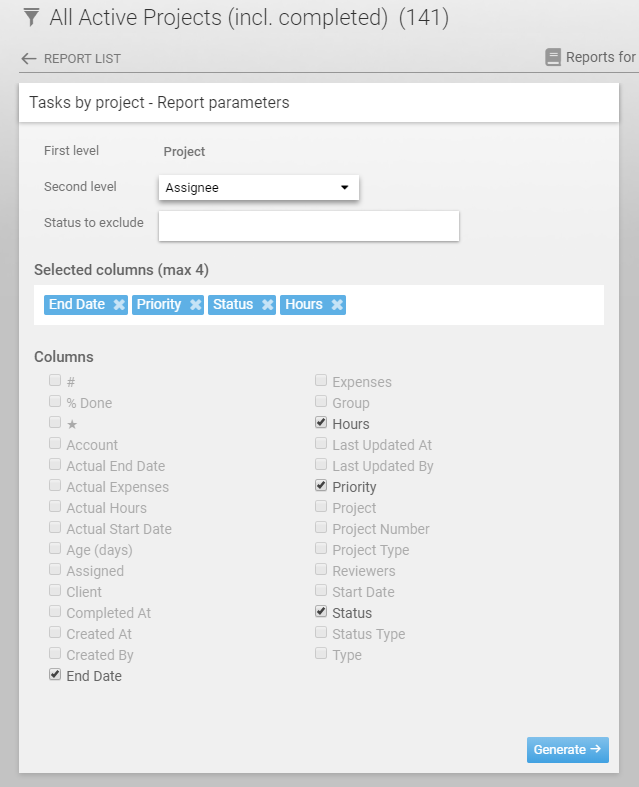
The report is created and the user can navigate directly and then export to the desired format such as PDF or Excel.