Asana News: Stronger Passwords and Security Controls for Admins
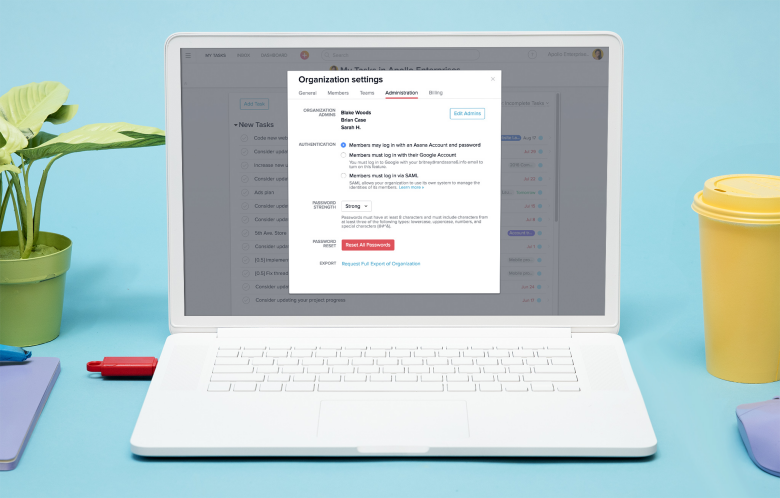
 Asana is helping Organization Administrators as it announced new security features. Admins can now enforce stronger password requirements for members. Apparently, poor or weak passwords are the cause of two out of three data breaches. This is according to a recent report that investigated business data breaches. Moreover, Admins can now force a company-wide password reset in case of emergency or to further ensure security. These new features are available to organization admins in Premium accounts.
New Password Strength Controls
Asana is providing its users more options for their password standards. Admins can set an organization’s standard to “simple”. Accordingly, this will require users to create passwords that are 6 characters long. “Strong” passwords should be at least 8 characters from at least 3 of the following types:
- lowercase
- uppercase
- numbers
- symbols (!@#&)
Furthermore, users can choose to log in via Google SSO or via SAML, if the organization has its own system to manage identities of its members.
 Asana
Asana Custom Fields is a project setting that allows you to create new attributes to sort and filter your tasks. As the name suggests, these fields are completely custom and can contain anything you like including plain text, numbers or a drop-down menu. One basic use of Custom Fields could be to create a field with a dropdown menu for priority e.g. High Priority, Medium Priority and Low Priority. Similar to before, you could then sort your project tasks by priority and hit all the high priority tasks first. The great thing about Custom Fields is that regardless of what you do or how you work,
  Nothing helps ensure the integrity of your brand quite like a brand style […]