
Trello Acquires Butler for Workplace Automation

Trello is a free visual project management and work organization software. It enables individuals, teams, and companies to manage their tasks and projects through boards, columns, and tasks in an easy and highly interactive way. The online productivity software launched in 2011. In early 2017, it was acquired by software company Atlassian for $425M. However, it is still functioning independently as part of Attlasian by making its very own acquisition. Just recently, it announced that it is acquiring Butler (Ludable LLC), to have its own native automation capabilities. If you are looking for a great reporting and exporting tool for Trello, we suggest trying out our own tool Bridge24 for Trello.

Butler Power-Up

Butler for Trello is a Power-Up that can automate boards with rules, scheduled commands, and custom buttons. It was developed by Oscar Triscon in 2016. Before Butler, Oscar noticed that he was doing the same things on his boards every day. He decided to create a Power-Up that can automate many repeatable tasks, believing that […]

By |2019-01-22T13:12:45-05:00January 22, 2019|

Top 3 Software Alternatives to Trello

trello-logoTrello is a free and flexible task and project management system presented through a system of boards, lists and cards. It is a highly visual and interactive tool that enables users to get instant overview and progress information at a glance. It is simple to use, where users can group, reorder and move tasks as cards across lists that can represent a work stage or phase. The tool works for a variety of teams and projects that can appear as a board. It is ready for collaboration and integration with many applications to enhance its functionality.

Why people are not happy with Trello

Trello is a very popular online software. Thus, companies are ready to pay for its premium plan or business class package to avail of features that are needed in their business. However, some users are realizing that although the free tool is fun to use, meeting business requirements is no laughing matter. Missing features are: subtasks, task dependencies, multi-board reporting, export to Excel, workload reports, […]

By |2019-01-21T08:55:52-05:00January 21, 2019|

Asana Vs Trello: Which Is Better for Creative Teams?

As the world moves increasingly to the cloud and the number of remote workers grows steadily higher, a range of tools have cropped up to help businesses and entrepreneurs work more efficiently. These span everything from money management to HR systems, covering every base a business might need. One of the more popular services that have arisen are productivity tools, in particular Asana and Trello.
These both provide teams with a way to track projects and assign tasks with far more ease than long, confusing email threads. But these tools are both very different in how they work, and one might be more suitable for you than another, especially as a creative. Let’s run through the pros and cons to find out which productivity tool is right for you.

Why use project management software?

Many businesses now make use of project management software to keep track of day-to-day tasks, as it offers a plethora of benefits. PMS is especially useful if you run a small business with […]

By |2018-10-01T08:47:02-04:00October 1, 2018|

Trello in the News: September 21, 2018

Our goal is to monitor everything that is written about Trello on a daily basis. All articles below were published on September 21th 2018 and are about how Trello can complement your business needs. You have a link to each original article, and also Twitter links if you want to contact the article’s author or the website’s owner for more information.

If you are a Trello user and need a great reporting and exporting tool, we recommend using our own tool Bridge24 for Trello.


Tips for building business to business products

Article Quote: “As an example, a big organisation may use a corporate travel product. It’s main users will be people wanting to book hotels and flights for their business trip, but there are likely to be several other types of user. There may be project managers using it to see who has the right visa to work on their project, or HR managers trying to see if there are ways of reducing the travel budget. On […]

By |2018-09-22T21:41:38-04:00September 22, 2018|

New Trello Features, Power-Ups, and Tricks To Try

Trello helps countless teams manage their projects in an easy and fun way. And it gets easier and more exciting as new features become available almost every month. Now, users are using emoji reactions, an informative Home screen, and an Inspiration portal, among others, to collaborate with the rest of the team in better and more meaningful ways. In fact, just this July, this project management software introduced several new features, 3 Power-Ups and mobile app enhancements that will bring more smiles. If you are looking for a great reporting and exporting tool for Trello, we suggest trying out our own tool Bridge24 for Trello.

New Features: New Sort Options

Users now have more options to sort their card list. Depending on the items added on the cards, people can now sort by date created, either newest first or oldest first. They can sort by due date, if that is added on the cards. They can sort by the number of votes a card received, if the Voting […]

By |2018-08-14T08:21:20-04:00August 14, 2018|

8 Browser Extensions For Trello To Amp Up Productivity

Trello visual project management and work organization software is being used by individuals, teams and companies across the globe. It enables them to complete tasks, meet deadlines, and achieve goals in a simple and collaborative way. It is easy to use and very flexible. Power-Ups or integrations allow the software to bring in more features from third-party applications. These Power-Ups provide stable and reliable functionality to core features. Another way to enhance the PM software is by using browser extensions. If you are looking for a great reporting and exporting tool for Trello, we suggest trying out our own tool Bridge24 for Trello.

8 Trello Browser Extensions

These browser extensions enable Trello users to experience an additional one or more features. They are all Chrome extensions, but if similar ones exist for other browsers such as Firefox and Safari, they are mentioned. Opera users can add all the extensions for Chrome but they need to install the Chrome Extensions add-on first.

1. Original Card Counter for Trello

Original Card Counter […]

By |2018-08-14T08:17:53-04:00August 14, 2018|

Find Trello Templates, Samples in New Inspiration Portal

Trello empowers its users by providing a collaborative tool that help boost productivity. People strive to create, build, or produce something much more than what they started with. We begin with little, but we work hard to make something bigger or better at the end of our project or process. Success is possible, and others have done it many times before. But instead of reinventing the wheel, it is wiser to look for tips, techniques, or templates from people who are already successful. And Trello’s new Inspiration makes it easy to find them. If you are looking for a great reporting and exporting tool for Trello, we suggest trying out our own tool Bridge24 for Trello.

Introducing Trello Inspiration

Trello now makes available its Inspiration portal (trello.com/inspiration) to help people find board templates, samples, and success stories. It is a collection that comes from users around the world. Therefore, searching for that workflow, board or strategy and making it one’s own is now as simple as going to […]

By |2018-07-14T19:41:04-04:00July 14, 2018|

Trello Launches New Home View and Notification Management

Trello visual project management application has recently achieved a significant milestone. To date, over 2 billion cards have been created, helping its users plan, prioritize, and produce. Indeed, these cards represent, more or less, 2 billion ideas, tasks, and projects from all over the world. These cards contain all sorts of things, from helping teams deliver humanitarian aid, to families planning their camping trips. In line with continuing to provide people the central place for organization and productivity, it launches 2 important features: a new Home view, and a better notification management system. If you are looking for a great reporting and exporting tool for Trello, we suggest trying out our own tool Bridge24 for Trello.

New Trello Home View

The new home view is the equivalent of a central base of operations where users can find anything and everything important. Why go over countless boards, cards, and comments, and then try to prioritize which should be first when there is a better way? The new home view […]

By |2018-05-16T15:51:59-04:00May 16, 2018|

Interactive Charts for Trello using Bridge24

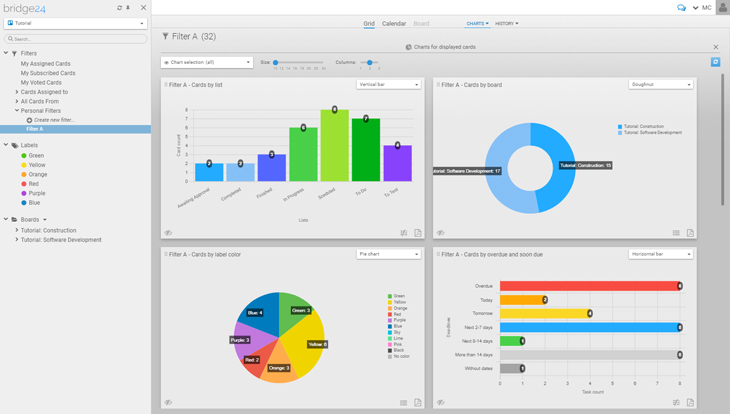
Bridge24 New Feature - ChartsTrello is a great operational tool for users to centrally collaborate on board and card information. However, reporting features are limited! With Bridge24, users can connect dynamically to Trello and instantly create and export powerful charts and card lists for basic reports.
Benefits of Using Charts

Charts aide in a quick understanding of the distribution of cards and provide an overview to access information through a visual representation. Rather than looking through lists and lists of cards or extensive filtering and searching, find information at a glance visually through a chart. The chart can also be exported (PDF format) to share with managers or co-workers to quickly see patterns and other aggregate information for comparisons, etc.

Charts Based on a Board or Filters, and How to Access

The charts in Bridge24 are contextual and based on the current cards displayed from a board or filter results. In the case where you wish to include archived […]

By |2018-04-21T20:26:17-04:00April 21, 2018|

Trello Custom Fields Power-Up Expands Big Time!

Trello project management and collaboration software is a highly visual and flexible tool. It applies to a variety of work requirements for various groups of people. Teams use it to easily organize and prioritize their projects. Specifically, Power-Ups expand its capabilities further by bringing integration features right into boards and cards. In 2016, it announced the release of the Custom Fields Power-Up to help users maximize their workflow. Now, users can enjoy even more its expanded capabilities. If you are looking for a great reporting and exporting tool for Trello, we suggest trying out our own tool Bridge24 for Trello.

Custom Fields Go Mobile

The first welcome news about the latest Custom Fields Power-Up is its availability on mobile devices. Both iOS and Android apps now support custom fields. Therefore, users can experience the additional benefits of having more context for their cards even outside the office. Furthermore, they can also create new fields or input/edit field data. So, all their custom fields from the web are […]

By |2018-03-27T07:45:58-04:00March 27, 2018|
Go to Top