
Gantt by Assignee: Easily Visualize Team Workload
Great news for Bridge24 users on Trello and Basecamp!
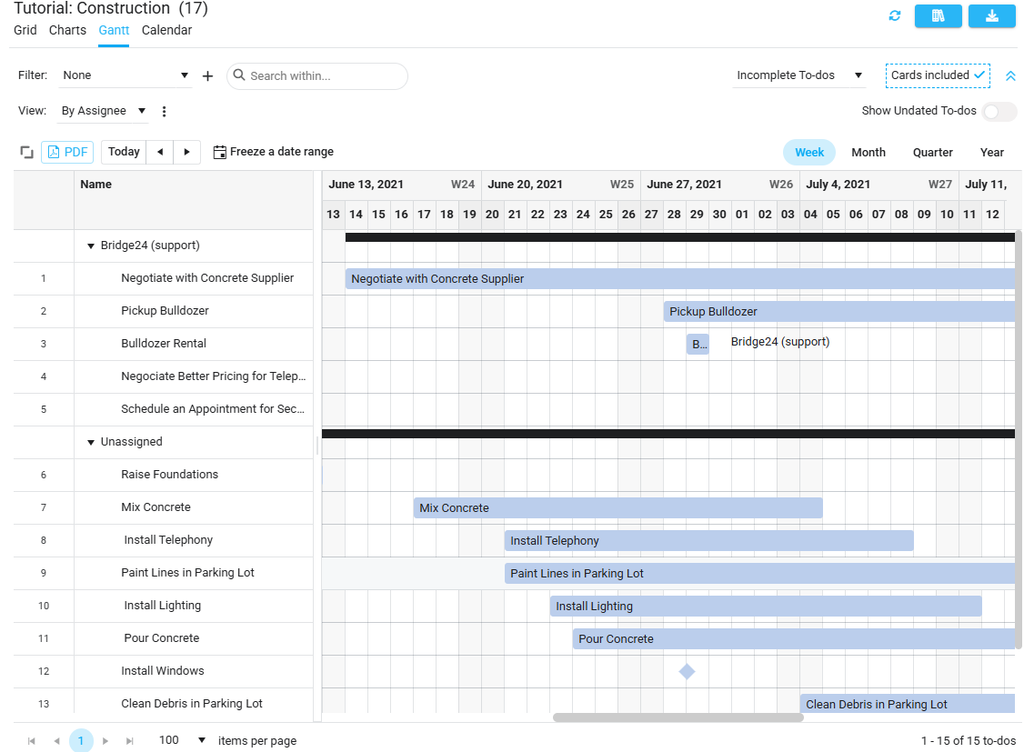
You can now group your Gantt chart by Assignee.
This view allows you to see at a glance:
- Who is currently over capacity
- Who has availability for new tasks
- Unassigned or multi-assigned tasks (grouped in their own dedicated section)
You get a clear and immediate overview of everyone’s responsibilities.
How to enable it:
Simply activate this feature in the view edit options:
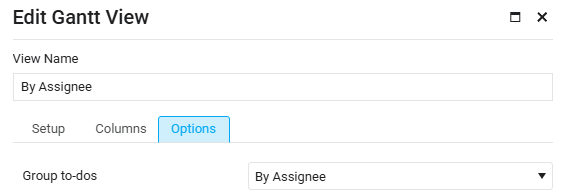
Ideal for balancing workload fairly across your team.
Try it out today in your Bridge24 Gantt view!
Gantt par Assigné : visualisez la charge de travail
Bonne nouvelle pour les utilisateurs de Bridge24 sur Trello et Basecamp !
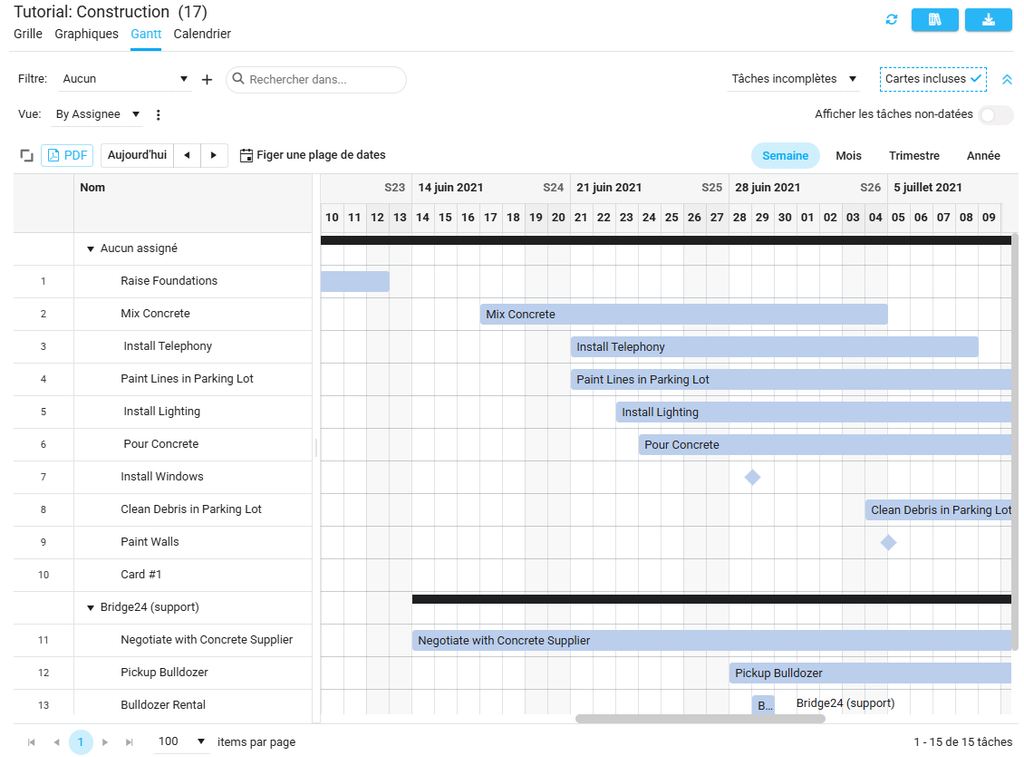
Vous pouvez maintenant regrouper votre diagramme de Gantt par Assigné.
Cette vue vous permet de voir en un coup d’œil :
- Qui est actuellement surchargé
- Qui a de la disponibilité pour de nouvelles tâches
- Les tâches non assignées ou multi-assignées (regroupées dans leur propre section)
Vous avez une vision claire et immédiate des responsabilités de chacun.
Activez la fonctionnalité dans les options d’édition de la vue
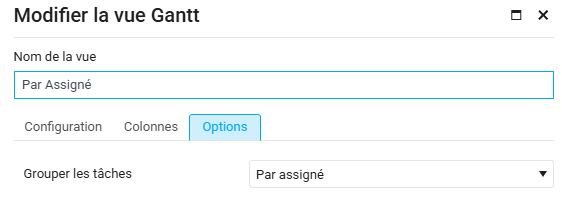
Idéal pour répartir le travail plus équitablement.
Essayez-le dès maintenant dans votre vue Gantt Bridge24.
How Bridge24 Synchronizes Your Asana, Basecamp, and Trello Data
At Bridge24, we know that trust is the cornerstone of project management. When you connect tools like Asana, Basecamp, or Trello to our platform, you are entrusting us with access to your most strategic information: your tasks, your projects, and your teams.
This is why we have designed our architecture with one absolute priority: your privacy.
Today, we want to pull back the curtain on the technology that powers Bridge24 to explain exactly how we handle your data.
Your Data Stays with You (And Nowhere Else)
The question we are asked most often is, “Where is my data stored?”
The answer is simple: in your browser.
Bridge24 utilizes a technology called IndexedDB. It is a local database built directly into your web browser.
Essentially, when you use Bridge24, we act as an interface for viewing and manipulating your data: we display it, but we do […]
Comment Bridge24 synchronise vos données Asana, Basecamp et Trello
Chez Bridge24, nous savons que la confiance est le pilier central de la gestion de projet. Lorsque vous connectez vos outils comme Asana, Basecamp ou Trello à notre plateforme, vous nous confiez l’accès à vos informations les plus stratégiques : vos tâches, vos projets et vos équipes.
C’est pourquoi nous avons conçu notre architecture avec une priorité absolue : la sécurité de vos données.
Aujourd’hui, nous souhaitons lever le voile sur la technologie qui alimente Bridge24 pour vous expliquer comment nous traitons vos données.
Vos données restent chez vous (et nulle part ailleurs)
La question que l’on nous pose le plus souvent est : « Où sont stockées mes données ? ».
La réponse est simple : dans votre navigateur.
Bridge24 utilise une technologie appelée IndexedDB. Il s’agit d’une base de données locale intégrée directement à votre navigateur web. […]
📎How to Download All Attachments from Asana Using Bridge24
One of the most frequently asked questions about Bridge24 is:
How can I download all attachments from my Asana account?
Here’s a quick guide to help you do just that.
🔍 Important Note: Bridge24 allows you to download attachments only from tasks and subtasks—not from projects, comments, or other entities.
✅ Step-by-Step Instructions
- Filter tasks with attachments
In the left-hand menu, select “All Tasks / With Attachments” to display only tasks that contain files. - Adjust the task filter
At the top right, change the filter from “Incomplete Tasks” to “All Tasks” to ensure no attachments are missed. - Export attachments
Once all tasks are loaded, click the “Export” button in the top right corner and choose “Attachments” from the dropdown. - Start the download
In the export window, click “Start”. Bridge24 will bundle all attachments into one or more ZIP files for you to download.
Basecamp – All Tasks, One Place
Basecamp 3 offers three types of tasks.
The primary task type — available since the platform’s inception — is the classic to-do.
Later, Basecamp introduced a board view with tasks represented as cards, offering a more visual, Kanban-style workflow.
Within each card, you can add sub-tasks called “Steps.” These steps can have their own assignees and due dates, independent of the card’s main settings.
However, viewing all this information — to-dos, cards, and steps — in one place within Basecamp can be challenging, as it requires navigating through multiple sections.
Bridge24 solves this by allowing you to view all these task types in a single, unified interface.
Simply create a search, specify that you want to include cards, and enable the option to expand steps.
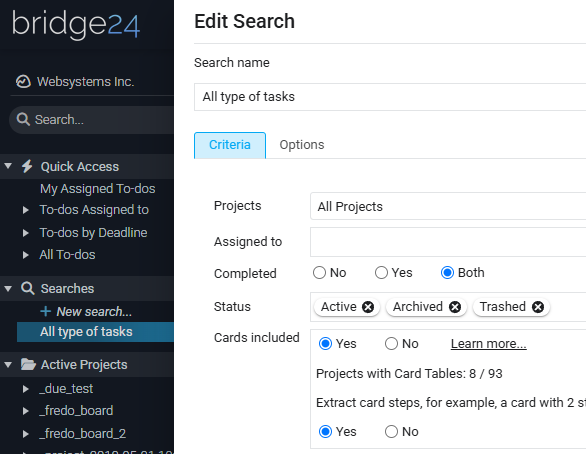
Finally, look at the results in the data grid.
Top 10 Ways to Use Asana for Agile Project Management

Today, the use of agile methodology is on the rise. Did you know that 70 percent of companies implementing agile practices were able to better manage their changing priorities? Yes, you read it right!
Besides that, you can also expect an increase in team productivity, better process discipline, and improvement in the quality of outcomes. When it comes to agile project management, Asana is the top tool that most companies leverage. According to recent research, 58% of teams use agile tools and practices in their work. The online project management tool empowers teams to effectively and efficiently plan, organise, and manage different agile projects.
Are you ready to get started with agile project management using Asana? In this blog, you will explore the top 10 ways to use the tool like a pro. Let’s dive in!
Top Reasons to Use Asana for Agile Project Management
Asana: Search your Tasks by Custom Field
- Enum: Clicking this primary node will display all tasks using any value […]
We just released an effortless way to search your tasks by custom field across all your projects, and you’ll love it!
Context: In Asana, you can search your tasks by custom fields that are global to your workspace. You have to use the upper search bar and build your search each time you want to use a different custom field.
Solution: In Bridge24, a new node has been added to the left panel treeview: Tasks by Custom Field. The global custom fields that are available in your workspace will be displayed in the treeview. No need to create a search for each one. See the image below:
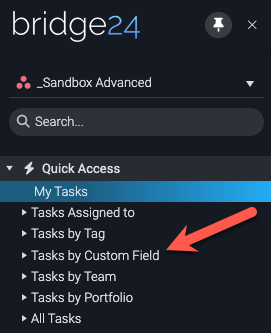
When expanding the node, you can see all global custom fields with enum, number, and text types. Unfortunately, the Asana API doesn’t support the other custom field types.
- Enum: Clicking this primary node will display all tasks using any value […]
Top 10 Best Advantages of Using WooCommerce

Did you know that more than 6.5 million websites on the internet use WooCommerce? WooCommerce, a robust e-commerce plugin for WordPress, has become a preferred choice for businesses aiming to establish and expand their online presence.
WooCommerce’s combination of user-friendly features, flexibility, scalability, and cost-effectiveness makes it a top choice for businesses entering the e-commerce world. It is also an integral part of the WordPress ecosystem, inheriting the strengths of the world’s most popular content management system while offering specialized tools for online retail.
So, whether you are a business owner, e-commerce manager, digital marketer, or website developer, WooCommerce is an ideal platform.
10 Pros & Advantages of Using WooCommerce
1. Seamless Integration with WordPress
Did you know that 20% of the websites built on WordPress use the WooCommerce plugin? Whether content integration or the user authentication system, WooCommerce seamlessly integrates […]
5 Ways How AI is Revolutionizing Trello for Project Management
- Boards and Lists: Create boards for different projects and lists […]
Various tools help automate many routine and paper processes, and project management is no exception. One such service is Trello, which uses AI to predict risks, automate tasks, analyze historical project data, plan, and much more. With the integration of AI, Trello is redefining how teams collaborate and manage their projects.
This article explores five innovative ways AI revolutionizes Trello for project management, making it a more robust and efficient platform for teams worldwide.
How Trello Helps Project Managers
Trello is a versatile Kanban-based tool for project managers that remains a favorite among teams due to its intuitive design, ease of use, and a wide range of helpful features. Trello helps teams organize tasks, set priorities, and streamline workflows.
Known for its practical interface and flexibility, Trello uses boards, lists, and cards to represent projects, stages, and tasks.
Key features include:
- Boards and Lists: Create boards for different projects and lists […]